
Declustering & Compositing#
import geolime as geo
import seaborn as sns
import matplotlib.pyplot as plt
import numpy as np
import pandas as pd
from pyproj import CRS

geo.Project().set_crs(CRS("EPSG:26909"))
dh_tom = geo.read_file("../data/dh_tom.geo")
survey_tom = pd.read_csv("../data/survey_tom.csv")
Filtering on Tom West Prospect#
For simplicity of the tutorial, we will keep working only in the Tom West Prospect. The same workflow can be applied to all prospects.
dh_tom.set_region("TMZ", "Prospect == 'Tom West'")
dh_tom.keep_holes("TMZ", method=geo.RegionAggregationMethod.ALL)
dh_tom.plot_2d(property="Prospect", agg_method="first", interactive_map=True)
Declustering#
sns.histplot(
    x=dh_tom.data(
        "Zn_pct",
        region="Zn_pct.notna()"
    ),
    bins=30,
    log_scale=True,
    stat='percent',
    color='red'
)
<Axes: ylabel='Percent'>
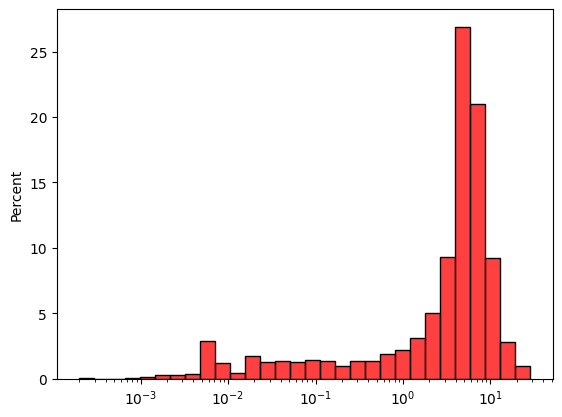
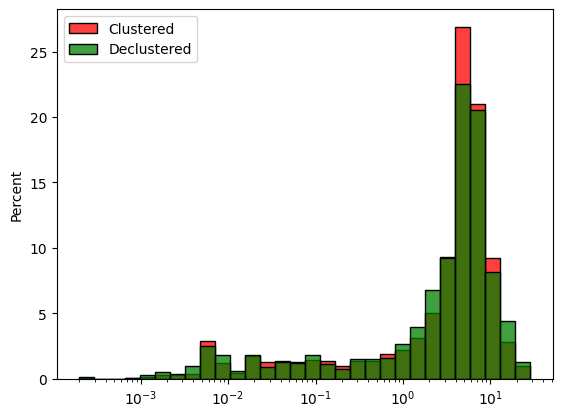
Using fairly the size of the drill spacing along x and y and using a large scale in z, we can compute the declustering weights.
declus_weight_mw = geo.moving_window_declus(
    obj=dh_tom,
    obj_region="Zn_pct.notna()",
    obj_attribute="Zn_pct",
    diam_x=200,
    diam_y=200,
    diam_z=1500,
    geometry="BALL"
)

print("Weight mean: ", declus_weight_mw.mean())
Weight mean: 1.0
moving_window_declus outputs a numpy array of values with a mean of 1. The declustered histogram can also be visualised using seaborn and the weights parameter.
declus_weight_mw
array([0.77649391, 0.79988228, 0.8014917 , ..., 0.54269942, 0.54269942,
       0.5412247 ], shape=(2665,))
dh_tom["declus_weight_cd"] = "nan"
dh_tom.update_property("declus_weight_cd", data=declus_weight_mw, region="Zn_pct.notna()")
fig, ax = plt.subplots()
sns.histplot(
    x=dh_tom.data("Zn_pct", region="Zn_pct.notna()"),
    bins=30,
    log_scale=True,
    stat='percent',
    ax=ax,
    color='red',
    label='Clustered'
)
sns.histplot(
    x=dh_tom.data("Zn_pct", region="Zn_pct.notna()"),
    weights=declus_weight_mw,
    bins=30,
    log_scale=True,
    stat='percent',
    ax=ax,
    color='green',
    label='Declustered'
)
ax.legend()
plt.show()
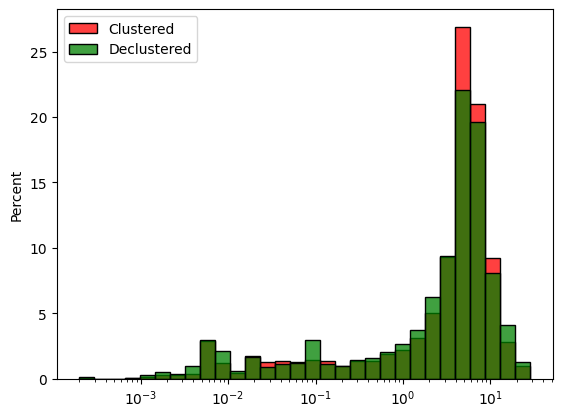
Cell Declustering is also available and works in the same manner.
declus_weight_cd = geo.cell_declustering(
    obj=dh_tom,
    obj_region="Zn_pct.notna()",
    obj_attribute="Zn_pct",
    size_x=200,
    size_y=200,
    size_z=1500,
    nb_off=50
)

print("Weights mean: ", declus_weight_cd.mean())
Weights mean: 0.9999999999999961
fig, ax = plt.subplots()
sns.histplot(
    x=dh_tom.data("Zn_pct", region="Zn_pct.notna()"),
    bins=30,
    log_scale=True,
    stat='percent',
    ax=ax,
    color='red',
    label='Clustered'
)
sns.histplot(
    x=dh_tom.data("Zn_pct", region="Zn_pct.notna()"),
    weights=declus_weight_cd,
    bins=30,
    log_scale=True,
    stat='percent',
    ax=ax,
    color='green',
    label='Declustered'
)
ax.legend()
plt.show()
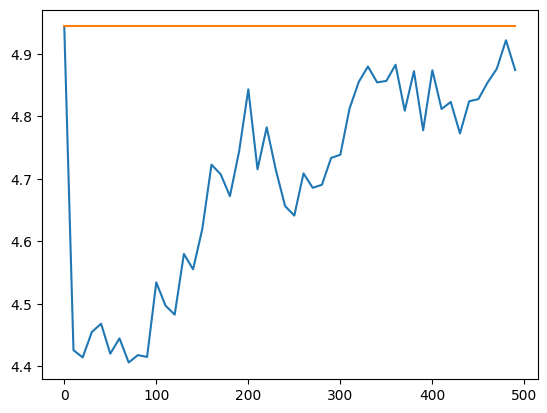
Declustering size of cell or ellipsoid can be found using a loop over different size and taking the size minimizing the mean of the data.
x_cs_cd = np.arange(0, 500, 10)
naive_mean = dh_tom.data("Zn_pct", "Zn_pct.notna()").mean()
var_mean_cd = [naive_mean]

for s in x_cs_cd[1:]:
    declus_weight_cd = geo.cell_declustering(
        obj=dh_tom,
        obj_region="Zn_pct.notna()",
        obj_attribute="Zn_pct",
        size_x=s,
        size_y=s,
        size_z=1500,
        nb_off=25
    )
    var_mean_cd.append(np.mean(declus_weight_cd * dh_tom.data("Zn_pct", "Zn_pct.notna()")))
fig, ax = plt.subplots()
ax.plot(
    x_cs_cd,
    var_mean_cd,
    label="Declustered Mean"
)

ax.plot(
    x_cs_cd,
    np.full((len(x_cs_cd)), naive_mean),
    label="Naive Mean"
)
plt.show()
Compositing#
To perform compositing, we can create a new property called sample_length and analyse its distribution to find the most common lenght of the samples.
dh_tom.set_property(name="sample_length", data="TO - FROM")
dh_tom.user_properties()
['X_COLLAR',
 'Y_COLLAR',
 'Z_COLLAR',
 'X_M',
 'Y_M',
 'Z_M',
 'X_B',
 'Y_B',
 'Z_B',
 'X_E',
 'Y_E',
 'Z_E',
 'Ag_ppm',
 'Pb_pct',
 'Zn_pct',
 'BD_tonnes_m3',
 'Method',
 'Comment',
 'LowRecovery___85pct',
 'HoleType',
 'Year',
 'Property',
 'Prospect',
 'Grid',
 'NewsRelease',
 'Length_m',
 'declus_weight_cd',
 'sample_length']
dh_tom.describe(properties=['sample_length'])
| sample_length | |
|---|---|
| count | 2668.000000 |
| mean | 1.070956 |
| std | 0.417748 |
| min | 0.100000 |
| 25% | 0.920000 |
| 50% | 1.000000 |
| 75% | 1.500000 |
| max | 4.600000 |
geo.histogram_plot(
    data=[{"object": dh_tom, "property": "sample_length"}],
    width=650,
    height=400,
    histnorm='percent',
    title=f'Sample length {len(dh_tom["sample_length"])}'
)
1m seems to be the most common value and will be used for compositing. Additional check such a histogram comparison can be made to asses the composite length.
dh_tom_2 = geo.compositing(
    drillholes=dh_tom,
    attribute_list=["Zn_pct", "Pb_pct", "Ag_ppm", "declus_weight_cd"],
    composit_len=1.,
    minimum_composit_len=0.3,
    residual_len=0.5,
    survey_df=survey_tom
)
2026-09-28 01:03:06,847 [INFO] GeoLime Project - |GEOLIME|.drillholes_compositing.py : Following survey mapping has been identified: {
    "AZIMUTH": "Azimuth",
    "DEPTH_SURVEY": "Depth_m",
    "DIP": "Dip",
    "HOLEID": "HoleID"
}
fig, ax = plt.subplots()
sns.histplot(
    x=dh_tom.data("Zn_pct", region="Zn_pct.notna()"),
    bins=30,
    log_scale=True,
    stat='percent',
    ax=ax,
    color='red'
)
sns.histplot(x=dh_tom_2.data("Zn_pct", region="Zn_pct.notna()"), bins=30, log_scale=True, stat='percent', ax=ax, color='green')
<Axes: ylabel='Percent'>
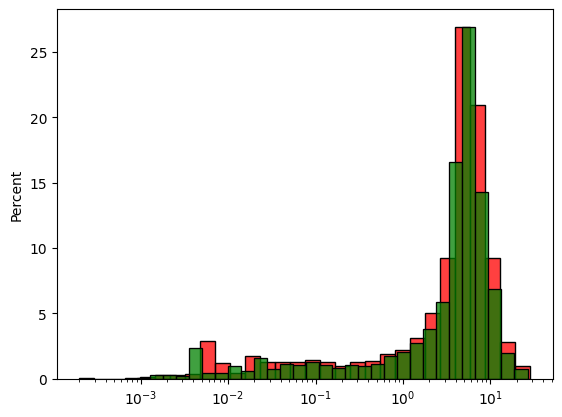
DataFrame can also be created to have a summary comparing the original and composited Drillholes.
pd.DataFrame(
    [dh_tom.describe("Zn_pct"), dh_tom_2.describe("Zn_pct")],
    index=['original', 'composited']
).T
| original | composited | |
|---|---|---|
| count | 2665.000000 | 2966.000000 |
| mean | 4.943900 | 4.899793 |
| std | 4.011429 | 3.752551 |
| min | 0.000200 | 0.000900 |
| 25% | 1.800000 | 2.164531 |
| 50% | 4.800000 | 4.823285 |
| 75% | 6.700000 | 6.600000 |
| max | 28.600000 | 26.537500 |
Export to file for future use. geo files allow faster reading and writing.
dh_tom_2.to_file("../data/dh_tom_comp.geo")